Custom 3D Printing Service
How it works, what it costs, when to use it
No tooling. No minimums. From CAD to delivered parts in days. Production quality, every time.
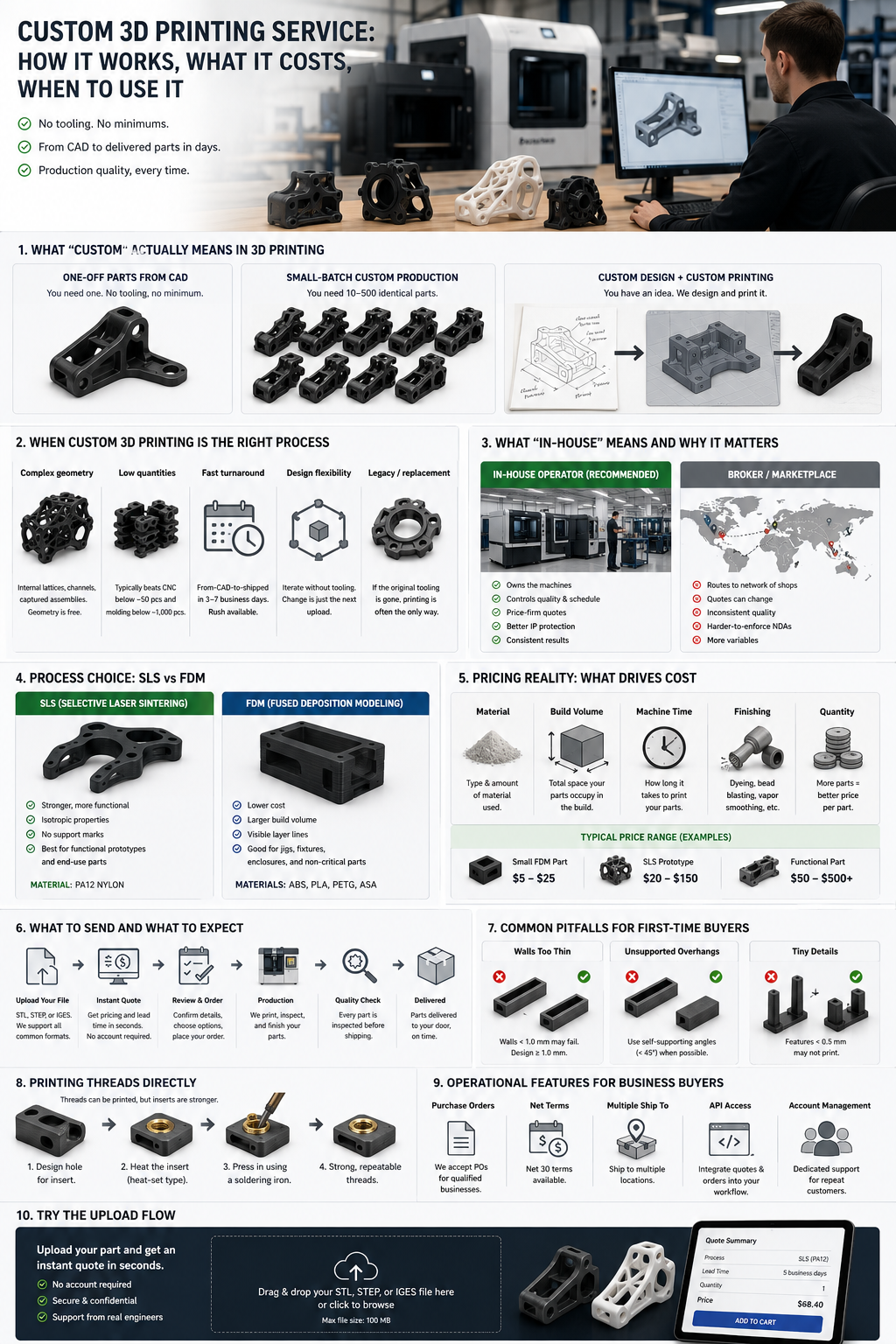
Want the whole picture in one image?
Download the full PartGuys custom 3D printing infographic (PNG).
"Custom 3D printing service" is one of those phrases that means something slightly different to everyone using it. To a startup founder, it's "I have a sketch on a napkin and need a physical thing." To a manufacturing engineer, it's "we need 200 brackets next week, no time for tooling." To a designer at a Series A, it's "this enclosure has to look right by Friday's pitch."
All three are right. A custom 3D printing service is the modern equivalent of having an in-house machine shop — except instead of negotiating capacity and turnaround with a master machinist, you upload a CAD file and a printer in someone else's facility makes the part. This page walks the whole picture: what "custom" really means in 3D printing, when it's the right call, what it costs, and what to send when you're ready to order.
If you already know the basics, jump to How to send a file or Pricing reality. Otherwise, start at the top.
What "custom" actually means in 3D printing
Every 3D-printed part is technically custom — the printer doesn't know or care what it's printing. But in practice, "custom 3D printing service" usually refers to one of three jobs:

One-off parts from CAD
You have a designed part. You need one of it. No tooling, no minimum order. The classic use case: a replacement bracket whose original is discontinued, a one-of-one fixture for a manufacturing line, a prototype for a design review.
Small-batch custom production
You have a designed part. You need 10–500 of them, all identical. Production economics without tooling cost — useful when you're past the prototype stage but not committing to injection molding yet.
Custom design + custom printing
You don't have a CAD file yet. A sketch, a photo, a written description, or a broken part. A design service creates the CAD; the printer produces it. Useful for non-CAD users, broken-part replacements, and rapid concept exploration.
PartGuys handles all three. The first two run through the standard upload-and-quote flow. The third routes through our design service first.
When custom 3D printing is the right process
The honest answer: when one or more of the following is true.
- Geometry complexity is high. Internal lattices, conformal cooling channels, captured assemblies that come out pre-articulated, organic shapes from generative design — 3D printing makes geometry essentially free. Machining and molding charge by complexity; printing doesn't.
- Quantity is low. Below ~1,000 units of an injection-friendly part, 3D printing usually beats molding because there's no tooling cost to amortize. Below ~50 units of a machinable part, 3D printing usually beats CNC on cost.
- Lead time is the constraint. SLS PA12 ships in 5 business days as standard, not the 4–8 weeks of soft tooling, and Rush makes it in 1 business day.
- Design might still change. Tooling locks you into a geometry. Printing doesn't. If you're iterating, every prototype round is just the next upload.
- Original tooling is gone. Replacement parts for legacy equipment, museum restoration, motorsport repair, niche industrial applications. If the original mold doesn't exist anymore and CNC isn't an option, printing is often the only way.
When custom 3D printing is not the right process: tight metal tolerances (machining wins), high-volume injection-friendly geometry (molding wins), parts that need to be transparent and optically clear (specialty SLA, not standard SLS or FDM), or applications requiring regulatory certifications we don't carry (medical class III, flight-critical aerospace).
What "in-house" means and why it matters
The custom 3D printing service market has two business models:
In-house operators
Own the machines, run them, and inspect parts before shipping. Quotes are price-firm because the same team controls schedule and cost basis. Quality is consistent because one QA standard applies to every job. PartGuys is in this group for the SLS and FDM work we run on our own machines in Michigan.
Broker / marketplace
Take your file, route it to a network of contract printers, and ship whatever the winning bidder produces. Wider process coverage, but real risks: quotes that change after the contract printer reviews the file, inconsistent quality across batches, harder-to-enforce NDAs because files touch multiple shops.
How to tell: look at the about page. "Our facility," "we operate," "in-house" → in-house operator. "Network," "partners," "supply chain" → broker. A hybrid (in-house for core processes, partner network for the rest) is increasingly common — PartGuys runs SLS and FDM in-house and partners out metal AM, urethane casting, and large-format work, with each path clearly labeled.
For repeat business, consistency, and IP protection, prefer in-house for your core process and treat partner-network access as a useful extension.
Process choice: SLS vs FDM (and when to look further)
Custom jobs almost always come down to two processes:
SLS (Selective Laser Sintering) — PA12 nylon
For functional parts — anything that has to hold up mechanically, take cycles, or include captured features. PA12 is mechanically similar to nylon-6 injection grades, so prototypes behave close enough to the final molded part to make real design decisions. SLS doesn't need support material; the unsintered powder around the part acts as support. This means you can print floating geometry, assemblies that come out pre-articulated, and overhangs that would be impossible in FDM.
FDM (Fused Deposition Modeling) — PLA / ABS / PETG
For cosmetic prototypes, fit-checks, jigs, fixtures, and large-format parts. FDM is the most accessible 3D printing process — visible layer lines, anisotropic strength (stronger along the bead than across it), and lower per-part cost than SLS. It's the right call when budget matters more than peak mechanical performance.
Rough decision rule: functional or feature-dense → SLS. Cosmetic or large → FDM.
Beyond these two, common alternatives — handled via partner network:
- SLA / resin for fine detail, jewelry, dental, or transparent parts.
- DMLS / SLM for metal parts in titanium, aluminum, stainless, or Inconel.
- MJF (HP's competitor to SLS) for slightly different surface finish at similar mechanical properties.
- Urethane casting for soft-touch overmolds or small batches that need to look injection-molded.
- CNC machining for tight tolerances or metals where AM isn't the right tool.
A good service handles the in-house processes directly and routes the rest, clearly labeled, so you're not guessing which path you're on.
Pricing reality
The two questions every buyer asks: "What does this cost?" and "Why does it cost that?"
What drives price in SLS
The workhorse for functional custom parts.
- Part volume. More material, more cost. Most of your bill.
- Bounding box. Bigger bounding box → less efficient nest packing → higher cost per part.
- Quantity. Per-part cost drops sharply with batch size because parts pack more efficiently. A 1-to-25 jump typically cuts per-part cost 30–50%.
- Finishing. Default is matte gray, slight grain. Dye, sanding, paint all add cost.
- Lead time. Rush queue runs at a premium for jumping the schedule.
What drives price in FDM
- Print time (driven by bounding box and layer height). Most of your bill.
- Material grade (PLA cheapest, PETG mid, specialty filaments more).
- Support material required by overhangs.
- Finishing (sanding, smoothing, paint).
- Lead time.
Rough single-part numbers
Gut-check only — actual quotes always beat these.
| Part | Typical price |
|---|---|
| Small FDM PLA part, ~80×80×40 mm | $15–$30 |
| Small SLS PA12 part, ~80×80×40 mm | $40–$80 |
| Batch of 25 of the same SLS part | 30–50% lower per part |
| Single CNC aluminum part of similar size | $80–$250 (partner network) |
A good quote engine shows all of this itemized — material, machine time, post-processing, shipping — so you can design for cost. A bad quote shows one number, which makes it impossible to know whether dropping wall thickness or hollowing the part would save real money.
What to send and what to expect
For a smooth first quote on a custom job, send:
- The geometry file. STL or STEP preferred; OBJ, 3MF, IGES all accepted. Exported in millimeters (always — STL units are the #1 source of size-error returns).
- Quantity. And whether you need them all at once or in batches.
- Material preference. Or "service to recommend" — for most parts the answer is straightforward.
- Lead time needed. Standard or rush.
- Critical dimensions in a separate drawing if any tolerances matter. STL files cannot carry tolerance call-outs; if a hole has to be 6.00 +0.05/-0.00, that needs to be communicated separately.
- NDA flag if the design is unreleased. Should be free and applied before files queue.
What happens next:
- Auto-analysis. A good service auto-detects units, splits multi-body files, segments oversized parts that exceed the build envelope, and flags obvious file issues (non-manifold edges, etc.).
- Itemized quote. Material, machine time, post-processing, shipping — broken out.
- Queue selection. Standard or rush. Lead times measured from order placement, not file approval.
- Print. SLS PA12: 5 business days standard, 3 Priority, 1 Rush. FDM: 6–7 business days standard, with Priority and Rush on some materials. Orders before 2:00 PM ET start the same day.
- QA. Automated dimensional and visual inspection before shipping.
- Ship. Via your carrier of choice, with real-time tracking.
For a designed-from-scratch custom job (no CAD yet), there's a step zero: send a sketch, photo, or written description to a design service. The designer returns a production-ready CAD file you can quote against. PartGuys offers this; not every service does.
Common pitfalls for first-time custom buyers
The things that cost time on a first order, in our observation:
For a deeper dive on file prep, our guide on how to print from an STL file covers the failure modes in detail.
Operational features for business buyers
If you're buying for a company, these matter more than the headline part price:
Their presence is a reliable signal of a service built for repeat business, not single-transaction customers.
Try the upload flow
Two paths to a quote at PartGuys:
1. Upload at partguys.io
Drop an STL or STEP file, the system measures and analyzes it, you pick a material and queue, you see itemized pricing on screen. No account required to see the quote.
Upload a file →2. Email files to quotes@quote.partguys.io
A pricing table comes back with a direct checkout link. Useful when files live inside a design-review thread and you don't want to break context to upload.
Both paths support free NDA coverage applied before printing starts. Both run through the same in-house SLS and FDM machines with the same QA process.
Save the full infographic
Everything on this page in a single shareable image.
Frequently asked
Can I print a single custom part?
Yes — no minimum order. Most jobs we run are between 1 and 50 units.
How fast can I get a custom part?
SLS PA12 is made in-house in Livonia, Michigan: 5 business days standard, 3 with Priority, and 1 business day with Rush (orders of $50 or more). FDM is 6–7 business days standard, with Priority and Rush (from 2 business days) on some materials. Orders placed before 2:00 PM ET start that day. Shipping time is on top of production time.
Will my design stay private?
With NDA enabled, yes. Coverage applies before files queue. Files are stored only against your account and never shared with third parties.
What's the largest part you can print?
Standard SLS envelope is ~340×340×605 mm; standard FDM is 300×300×300 mm. Larger parts can be auto-split into bonded segments at quote time, or routed to large-format partners.
Can I get help if I don't have CAD?
Yes — our design service takes a sketch, photo, or description and returns a production-ready file. Email or use the design-request flow on the homepage.
Do you ship internationally?
Yes, via your carrier of choice with real-time tracking.
Related reading
Have a Topic Suggestion?
We're always looking for new article ideas. Let us know what you'd like to learn about!